
Give your Windows XP (SP2) the Vista look
If you’ve had enough bad experiences upgrading your Microsoft products, you’re too poor to upgrade to Vista or you just refuse on principle, you can always customise Windows XP to make it look like Vista. The Windows Vista customisation pack gives you all the flashy features of Vista without having to shell-out a few hundred dollars for the original. It’s certainly proved a hit with Softonic users so far who have made this pack one of the site’s most popular downloads.
The pack includes a booty of Vista features including transparency of the windows, 3D Vista style icons, mouse cursors, boot screen, login screen, and a whole host of Vista themes to name a few. After installing the pack, you’ll be asked to restart, when you’ll find that your system has been through an impressive transformation although the fact that Windows Vista isn’t actually that radically different from XP, shouldn’t be held against this pack.
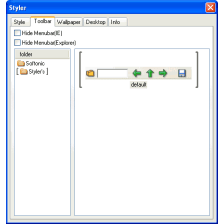
Amongst the major differences you will notice are some jazzy changes to your systems icons, skins and toolbars as well as new enhancements to your desktop such as a dock bar or if you prefer, a totally different system tray clock. Transfer file progress dialogs are transformed with swanky new 3D graphics and the sounds scheme has been beefed up to blow you out of your chair. Microsoft certainly spent lots of time designing these features. It was recently reported that they spent a year and a half just coming up with the start-up music alone.
Other changes include Windows Media Player which also receives a facelift although nothing worth getting excited about. The colours have been changed to a metallic-blue and the drop down menus have been replaced by an invisible menu which pops up when the mouse is waved over it. However, this feature actually becomes increasingly annoying with regular use and is best deactivated.
Whilst initially impressive, after a while these changes can cause problems. Users have reported that the new schemes not only slows down their PC’s but also cause it to crash randomly. It can also be a pain whenever there’s a problem with your PC. Since you are running a somewhat modified version of XP, normal troubleshooting guides may not work. You’ll subsequently have to uninstall the pack to make sure that it isn’t causing the problem. Fortunately however, the pack comes with an uninstaller that makes reverting back to XP simple although in time honoured Windows style, you’ll have to restart the computer.
For anyone who doesn’t add or remove programs regularly, we’d recommend this pack as it does an impressive job at emulating the $200+ Vista look. However, for those that make regular changes to their PC, the pack can end up being more hassle than its worth as the changes made can conflict with interfaces of other programs.


























User reviews about Vista Customization Pack
by Anonymous
Vista tema på xp.
Akta er för den här skiten en gång installerad och ni får inte bort den plus att den är full av buggar!!!!!!!!!
More
by Anonymous
It Will Not Work!!.
It will not work guys. You will have to repair or reinstall XP To get rid of this there are no effects as they say.
by Anonymous
Help.
i am trying to unintall this it looks like everythenk is gone but there is still the log on screen that is not back to normal please reply for me how to fix this proplem
Pros:
:d More
by Anonymous
ok i really need help....
ok what the hell first of all... i got this and my biggest concern is that stupid icon cache rebuilder tool thing keeps popping up and for some reason i cant find it in my system file i already made it so that it should show all my files so idk if thats it. i read on here that if you delete the cleanup.bat file then it would go away and i went to cleanup and it only showed the cleanmgr thing. somebody please help me find it so i can get this done otherwise its gonna bug me like crazy
Pros:
looks cool
Cons:
no uninstillation More
by Anonymous
really big problem.
how wouldi be able to revertback to normal if the install was not finished because of service pack 3 lack, i am trying to fix this by install SP2 and 3 but any other ideas.please send suggestions to commanderjao@hotmail.com
Pros:
looked god in the pictures
Cons:
no uninstaller/or difficult to More
by Anonymous
vcp uninstall.
for uninstalling it you no need to do any thing just goto start and go to help and restore the system at the time when you installed it
Pros:
good More